 Skip to content
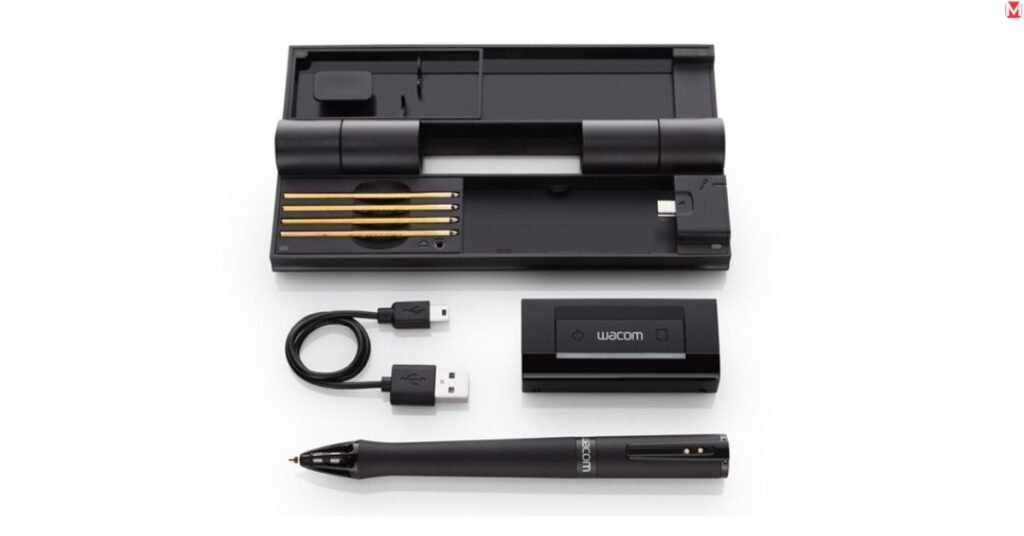
By enhancing the performance of your existing writing or drawing styles with the benefits of digital storage, a digital pen provides you with a way to connect your pen-and-paper writing and drawing to digital storage. Digital pens typically fall into two categories: a stylus is used with a touchscreen device (like a tablet), and a smart pen, which is used on paper while digitizing what you write or draw.

Quick Decision: Who Should Buy What
| Your Situation | Best Pick | Price |
|---|---|---|
| iPad user, all-around use | Apple Pencil Pro | ~$129 |
| Budget note-taker | Jamjake Stylus | ~$35 |
| Paper-lover going digital | Livescribe Symphony Smartpen | ~$149 |
| Galaxy Tab user | Samsung S Pen | Included |
| Aesthetic-first creative | Moleskine Pen+ Ellipse | ~$129 |
| Lightweight daily writing | Neo Smartpen M1+ | ~$119 |
| Reusable notes setup | Rocketbook + Pilot Frixion | ~$45 |
Still unsure? Keep reading, the right pick becomes obvious fast.
Digital Pens in 2026: What Makes Them a Must-Have Tool?

Smart pens aren’t a novelty anymore. They’ve become serious productivity hardware. The global stylus market is expected to exceed $5.2 billion by 2027, driven by remote work, paperless workflows, and smarter screen technology across every device category.
How Smart Writing Is Evolving
A few years ago, a smart pen meant a glorified touchscreen stylus with clunky app support. Today, it means real-time text translation, cloud sync, audio recording tied to specific written words, and latency so low you forget you’re writing on glass.
Active stylus pens now respond to pressure, tilt, and hover. Apps like GoodNotes, Nebo, and Notability have matured into full note-taking ecosystems. Palm rejection technology has improved dramatically, allowing you to rest your hand naturally on the screen while writing without triggering accidental marks.
Pro Tip: Always check latency specs before buying. Under 10ms feels completely natural.
Who Should Use Them Today
- Students — search handwritten notes by keyword instead of flipping 200 pages
- Remote professionals — annotate PDFs, sign contracts, and whiteboard in video calls
- Artists — draw with pressure sensitivity and tilt recognition mimicking real brushes
- Teachers — mark up student work or run interactive digital lessons
- Hybrid note-takers — love paper but need reliable digital backup via cloud services
If you write a grocery list twice a week, skip it. For everyone else, a quality electronic writing pen pays for itself within months.
Check Out This Helpful Guide: Air AC Portable
Best Digital Pens for Note-Taking

Ideal for Students and Professionals
Apple Pencil Pro — the benchmark iPad stylus for Apple users. It delivers 4,096 pressure levels, tilt sensitivity, and a double-tap shortcut switching tools instantly. Magnetic charging means no hunting for cables. It only works with M4 iPad Pro and iPad Air (M2 and later). Check your exact model before ordering.
Livescribe Symphony Smartpen: genuinely different from every other pen here. It records audio while you write, syncing your handwritten notes to the exact recording timestamp. Tap any written word, and audio jumps there instantly. Battery life runs around 8 hours solid for full days of lectures or meetings. The companion app connects everything via Bluetooth.
Neo Smartpen M1+: lightweight at just 11.5 grams and surprisingly accurate. It uses Ncode paper, captures every stroke, and syncs to the Neo app in real time. Language transcription supports 27 languages, a standout for multilingual users and international students.
Jamjake Stylus: the honest budget pick. USB-C charging, decent palm rejection, and a precise tip make it perfectly usable for everyday note-taking on Android or Windows tablets. Heavier than premium options, but at $35, you’re not paying for features you don’t need.
Features That Actually Improve Productivity
- Handwriting search finds any written word using text search; GoodNotes and Nebo handle this excellently
- Text translation converts handwritten notes into typed text automatically; Nebo’s accuracy across multiple languages impresses consistently
- Audio sync Livescribe Symphony does this better than anyone else on the market
- Cloud services integration, automatic backup to Google Drive, Dropbox, OneNote, or Evernote, means you never lose a page
- Palm rejection non-negotiable for comfortable, natural writing on any touchscreen
One metric most buyers completely ignore: latency. Anything above 20ms feels like ink chasing your hand. Under 10ms feels natural. Apple Pencil Pro sits at ~9ms. Samsung S Pen hits a remarkable 2.8ms.
Best Picks for Drawing and Creative Work

Precision and Pressure Sensitivity
For artists, pressure sensitivity isn’t just a feature; it’s the feature. Here’s what those numbers mean practically:
- 1,024 levels — basic sketching; transitions feel slightly stepped
- 4,096 levels — sweet spot for most illustrators; strokes feel smooth
- 8,192 levels — professional standard; Wacom Pro Pen 3 operates here
- 16,000 levels — XP-Pen X3 Pro Stylus reaches this; noticeable only in hyper-detailed rendering
Tilt recognition matters equally. It lets you shade by angling the pen exactly like a real pencil. Without it, shading feels mechanical regardless of pressure sensitivity levels.
Pro Tip: For artists, tilt sensitivity matters more than extra pressure levels; always prioritize it.
Tools for Artists and Designers
Wacom Pro Pen 3 the industry gold standard used in professional animation studios and design firms worldwide. EMR-based means zero battery ever, unlimited use, zero interruptions. Integrates seamlessly with Photoshop, Illustrator, and Clip Studio Paint.
Huion PW600 is closing the Wacom gap at roughly half the price. 8,192 pressure levels, full tilt support, excellent compatibility with Clip Studio Paint and Krita. The go-to recommendation for artists wanting professional results without premium pricing.
Moleskine Pen+ Ellipse is built for creatives who think better on paper but need digital output. Write in a Moleskine notebook, and the pen scans strokes in real time through a camera in its tip. Pair it with voice notes via the companion app. Analog-first, digital-friendly, and beautifully designed.
Microsoft Surface Slim Pen 2 is sleek and more capable than it looks. Haptic feedback simulates paper texture on screen, sounds gimmicky until you try it. Best drawing stylus pen for Surface Pro users wanting one device for everything.
Check Out This Helpful Guide: Best Portable Bluetooth Speakers
Key Features to Look for Before Buying
Battery Life and Performance
| Pen | Battery Type | Charge Time | Usage Time |
|---|---|---|---|
| Apple Pencil Pro | Li-ion (USB-C) | ~15 min | ~12 hours |
| Livescribe Symphony | Li-ion | ~2 hours | ~8 hours |
| Surface Slim Pen 2 | Li-ion | ~1 hour | ~15 hours |
| Wacom Pro Pen 3 | EMR (none) | Never | Unlimited |
| Neo Smartpen M1+ | Li-ion | ~1.5 hours | ~10 hours |
| Jamjake Stylus | Li-ion (USB-C) | ~1.5 hours | ~10 hours |
The Wacom wins on battery life by default. EMR pens draw power from the tablet itself. For everyone else, the Apple Pencil Pro’s 15-minute fast charge is a genuine daily advantage.
Compatibility with Devices
This is where most buyers make expensive mistakes.
Apple Pencil Pro works only with M4 iPad Pro and iPad Air (M2 and later) — not the base iPad, not older Pros. Windows devices use different protocols: MPP, Wacom AES, or USI. A pen built for one won’t work on another. The Adonit Note+ supports both MPP and Wacom AES, making it one of the most flexible tablet pens for Windows users.
Before buying, verify:
- Your exact device model and supported stylus protocol
- App support for pressure and tilt features in your workflow
- Whether Bluetooth is required for shortcuts
- The return policy — some pens simply feel wrong regardless of specs
Pro Tip: Match your pen to your device protocol first — great specs mean nothing on an incompatible device.
How to Choose the Right Digital Pen for Your Needs
Based on Your Daily Use
Taking notes in class or meetings? Go for Livescribe Symphony or Neo Smartpen M1+. Audio sync and handwriting search deliver more practical value than raw pressure sensitivity ever could.
Annotating documents professionally? Apple Pencil Pro on iPad or Surface Slim Pen 2 on Windows depends entirely on your existing ecosystem.
Check Out This Helpful Guide: AI Smart Glasses
Creating digital art professionally? Wacom Pro Pen 3, no contest. Budget tight? Huion PW600 is a capable, honest alternative.
Love paper but want digital backup? Moleskine Pen+ Ellipse or Rocketbook Notebook. Write with Pilot Frixion pens, scan via the app, wipe clean with a damp cloth, and reusable note storage that genuinely works.
Budget vs Premium Options
| Tier | Price | Best Pick | Trade-off |
|---|---|---|---|
| Budget | Under $50 | Jamjake Stylus | Basic pressure, fewer features |
| Mid-Range | $50–$100 | Adonit Note+ | Solid but not exceptional |
| Premium | $100–$150 | Apple Pencil Pro | Ecosystem dependent |
| Pro | $200+ | Wacom Pro Pen 3 | Overkill for casual users |
Spending more doesn’t always mean getting more. For basic handwritten notes, $35–50 covers everything most users genuinely need.
Common Mistakes to Avoid When Buying
Ignoring Compatibility Issues
The most common buyer regret: a pen that doesn’t work with their device. Apple Pencil 1st gen won’t pair with current iPad Pros. An MPP pen won’t function on a Wacom AES device. Always cross-reference your device’s exact model number against the pen’s official compatibility list. Five minutes of research prevents a painful, expensive return.
Overpaying for Unnecessary Features
8,192 pressure levels sound impressive. Most illustrators can’t reliably distinguish it from 4,096 without controlled side-by-side testing. Barrel rotation sounds exciting until you realize that few apps actually use it. Bluetooth-only shortcuts are useless inside apps that don’t support them.
Buy for your actual workflow, not the spec sheet.
Check Out This Helpful Guide: Wireless Speakers Buying Guide
Are They Worth It in 2026? Final Verdict
Pros and Cons
Pros:
- Searchable handwritten notes genuinely transformative for students
- Cloud backup protects your entire note storage from hardware failure
- Drawing precision rivals traditional tools for professional illustration
- Long-term savings over notebooks, physical pens, and printer supplies
Cons:
- Ecosystem lock-in is real especially Apple and Samsung
- Quality options start at $80–130 upfront
- Compatibility research is non-negotiable and sometimes confusing
- Learning curve exists when switching from traditional drawing media
Who Should Buy One
Buy one if you take notes regularly, work digitally, study seriously, or create visual content professionally. A quality note-taking pen or drawing stylus pays for itself fast.
Skip it if your only use case is tapping a touchscreen or scribbling a shopping list.
For students, creatives, and remote workers in 2026, investing in the right digital pen is one of the highest-return tech decisions you can make. Match it to your ecosystem, your workflow, and your budget. Then stop overthinking and start writing.
FAQ
Can I use any stylus pen on my iPad?
Basic capacitive styluses only tap and drag, no pressure, no tilt. For full Apple Pencil features, you need a compatible iPad model. Third-party options like Adonit Note+ support some features but not all.
Is palm rejection important for note-taking?
Absolutely. Without it, your resting hand triggers constant accidental marks. Any serious note-taking pen must support reliable palm rejection.
How does the Livescribe Symphony Smartpen work?
An infrared camera in the tip tracks position on micro-dot paper while a built-in microphone records audio. The companion app links each written word to the exact recording moment. Tap any word, hear what was said.
What’s the difference between EMR and battery-powered pens?
EMR pens draw power wirelessly from the tablet, no charging ever. Battery-powered pens need periodic recharging. EMR wins on convenience; battery pens often offer broader device compatibility.
Which digital pen suits someone switching from traditional drawing?
Start with the Huion PW600 paired with a Huion tablet. 8,192 pressure levels, tilt support, and natural pen weight ease the transition from traditional media without the Wacom price tag.

Ansa is a highly experienced technical writer with deep knowledge of Artificial Intelligence, software technology, and emerging digital tools. She excels in breaking down complex concepts into clear, engaging, and actionable articles. Her work empowers readers to understand and implement the latest advancements in AI and technology.
Pingback: Best Mini Heaters For Winter 2025: Compact, Safe & Energy Efficient - The Mainland Moment
Pingback: Best Mini Heaters For Winter 2025: Compact, Safe & Energy Efficient
Pingback: Best Portable Fans In 2025: Stay Cool Anywhere You Go