When I first started writing in Hindi online, I struggled more than I expected. I could speak fluently, think in Hindi, and even write on paper without effort—but the moment I sat in front of a keyboard, everything slowed down. English typing felt natural, but Hindi typing felt like solving a puzzle. That’s when I discovered Google Input Tools Hindi, and honestly, it changed everything for me.
In this article, I’ll walk you through my personal experience with Google Input Tools Hindi, how it works, why it matters, and how you can use it to type faster, smarter, and with confidence. I’ll keep things practical, clear, and grounded in real use—not theory.
What is Google Input Tools Hindi (From My Experience)
Google Input Tools Hindi is a typing tool that lets me write in Hindi using an English keyboard. Instead of memorizing complex Hindi keyboard layouts, I simply type words in English, and the tool converts them into Hindi automatically.
For example, when I type “namaste,” it instantly converts into “नमस्ते.”
This system uses transliteration, which means it understands phonetics—the way words sound—rather than forcing me to learn new key positions. Google designed this tool to make typing in Indian languages easier, especially for people like me who already use QWERTY keyboards daily.
According to official Google documentation, Input Tools rely on machine learning models to improve word suggestions and accuracy over time. That explains why it feels smarter the more I use it.
Why I Started Using Google Input Tools Hindi
I didn’t switch to this tool just for convenience. I had real problems that needed solving.
1. I wanted speed
Typing in Hindi using traditional layouts slowed me down badly. With Google Input Tools Hindi, I type almost as fast as I type in English.
2. I needed accuracy
Manual typing often led to spelling mistakes. The tool suggests correct words, which improves my writing instantly.
3. I wanted flexibility
Sometimes I mix Hindi and English in the same sentence. This tool lets me switch seamlessly without breaking my flow.
How Google Input Tools Hindi Actually Works
When I type in English letters, the tool processes my input and predicts the Hindi equivalent. It doesn’t just convert letters—it understands context.
For example:
- “kya” → “क्या”
- “mera naam harsh hai” → “मेरा नाम हर्ष है”
It also shows multiple suggestions. I can choose the right word if needed, which helps when words sound similar.
Google uses large language datasets to improve predictions. This is why common words appear correctly most of the time without any correction.
Where I Use Google Input Tools Hindi
I don’t just use it for one purpose. It has become part of my daily workflow.
Blogging and Content Writing
When I write Hindi articles, this tool saves me hours. I focus on ideas instead of struggling with typing.
Social Media
Posting in Hindi feels effortless now. Whether it’s captions or comments, I type quickly and naturally.
Emails and Communication
Sometimes I need to communicate in Hindi professionally. This tool helps me maintain clarity and correctness.
How I Set Up Google Input Tools Hindi
Getting started was simple for me. Here’s exactly how I did it:
1. Download
- Click the Download button for the ZIP/RAR file (approx. 10 MB).
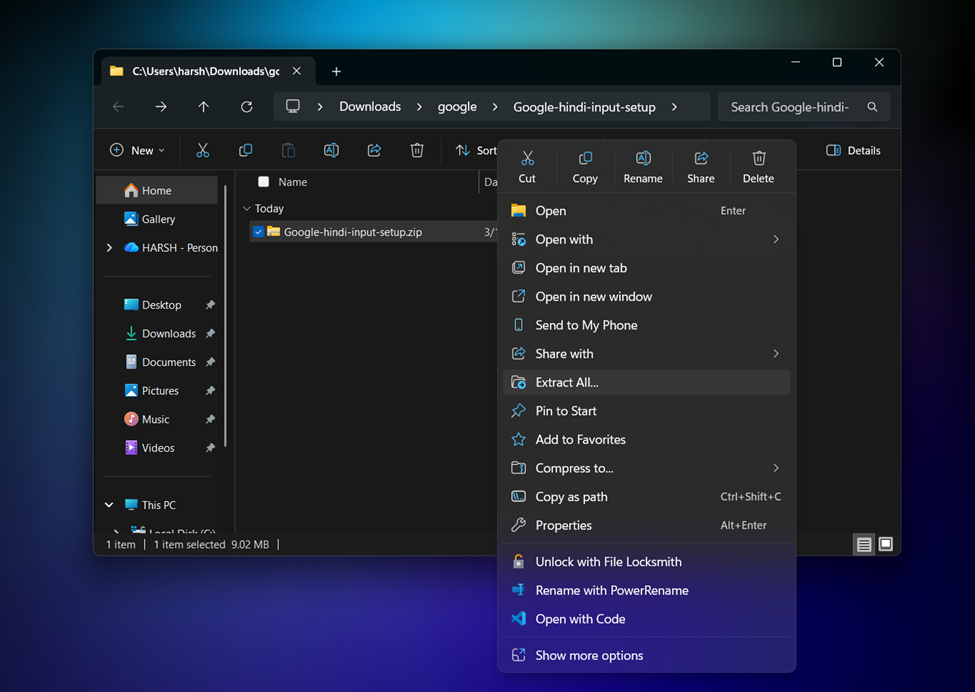
2. Extract
- Go to your Downloads folder.
- Right-click the file and select Extract Files or Extract Here.
- Note: If you don’t see this, install WinRAR or 7-Zip first.
3. Install Google Input Tool
- Open the extracted folder; you will see two setup files.

- Right-click the main tool (usually named GoogleInputTools.exe).
- Select Run as administrator.

- Click Yes on the prompt and then Finish once the bar completes.
4. Install Google Input Hindi
- Select the second file (usually named GoogleInputHindi.exe).
- Right-click and select Run as administrator.
- Click Yes to allow.
- Click Finish once the installation is successful.
5. Successful Setup
- Switch Language: Click the Language Icon (bottom right of your taskbar, usually says “ENG”).


- Open MS Word or Notepad. Type “Mainlandmoment” in English, and it will automatically convert to ” मैन्लान्द्मोमेंट”.

Note: Press Win + Space on your keyboard to instantly switch from English to Hindi (Google Input Tools).
Google Input Tools Hindi Without Virus (My Honest Advice)
When I first searched for google input tools hindi, I came across many websites offering direct download links. Some of them looked genuine, but honestly, I didn’t trust most of them.
So instead of taking risks, I follow a simple rule: I only use sources that I can verify.
Here’s exactly what I do to stay safe:
- I prefer downloading from Google’s official website or Chrome Web Store
- If I ever use a third-party link, I scan the file using antivirus tools before opening it
- I check the file size and publisher details carefully
- I avoid any “cracked” or modified versions
If you are planning to provide a direct download link in your article, I strongly suggest adding a disclaimer and encouraging users to verify the file themselves.
I have personally checked this file, but I still recommend scanning it before installation for your safety.
According to cybersecurity guidelines from companies like Microsoft and Google Safe Browsing, downloading software from official or verified sources reduces malware risks significantly.
So yes, you can use google input tools hindi which I provide, and it is safe and avoid untrusted website downloads.
Benefits I Noticed After Using It
Faster Writing
I now write Hindi content almost as fast as English. That alone improved my productivity.
Better Confidence
I don’t hesitate anymore while typing in Hindi. I know the tool will support me.
Improved Accuracy
Spelling errors dropped significantly. Suggestions guide me toward correct words.
No Learning Curve
I didn’t need to learn a new keyboard layout. I just typed naturally.
Limitations I Experienced (Being Honest Here)
No tool is perfect, and I want to keep this real.
1. Context Mistakes
Sometimes the tool suggests the wrong word if context is unclear. I need to pick the correct option manually.
2. Internet Dependency
Some versions require internet access for best performance. Offline support exists but may feel limited.
3. Formal Writing Challenges
For highly formal or literary Hindi, I still need to review and edit carefully.
Tips I Follow to Use Google Input Tools Hindi Better
Over time, I developed some habits that improved my experience:
Type Clearly
I type words the way they sound. This helps the tool understand my intent better.
Use Suggestions
I don’t ignore suggestions. They often improve accuracy and speed.
Proofread
Even though the tool is smart, I always review my content before publishing.
Practice Regularly
The more I use it, the better it feels. Speed and accuracy improve naturally.
Is Google-Input Tools Hindi Good for SEO Content?
Yes, and I say this from real experience.
Search engines like Google prioritize content that is clear, useful, and written for users. When I use Google Input Tools Hindi, I can focus on quality instead of struggling with typing. That improves readability and engagement.
Also, writing in Hindi helps reach a wider audience in India. According to reports from Google India and KPMG, Indian language internet users are growing rapidly and even surpass English users in many regions.
That means creating Hindi content is not just helpful—it’s strategic.
Google Input Tools Hindi vs Traditional Hindi Typing
Here’s how I see the difference:
| Feature | Google Input Tools Hindi | Traditional Typing |
| Learning Curve | Very low | High |
| Speed | Fast | Slow initially |
| Accuracy | High with suggestions | Depends on skill |
| Ease of Use | Simple | Complex |
| Flexibility | High | Limited |
For me, the choice became obvious.
My Final Thoughts on Google Input Tools Hindi
If you ask me honestly, Google Input Tools Hindi removed one of the biggest barriers in my writing journey. It turned Hindi typing from a struggle into something effortless and even enjoyable.
I don’t worry about keyboard layouts anymore. I don’t waste time searching for characters. I just type what I think, and the tool handles the rest.
If you create content, manage social media, write emails, or simply want to express yourself in Hindi online, I strongly recommend trying this tool. It doesn’t just improve your typing—it improves your overall communication.
And once you get used to it, there’s no going back.

Ansa is a highly experienced technical writer with deep knowledge of Artificial Intelligence, software technology, and emerging digital tools. She excels in breaking down complex concepts into clear, engaging, and actionable articles. Her work empowers readers to understand and implement the latest advancements in AI and technology.