Skip to content
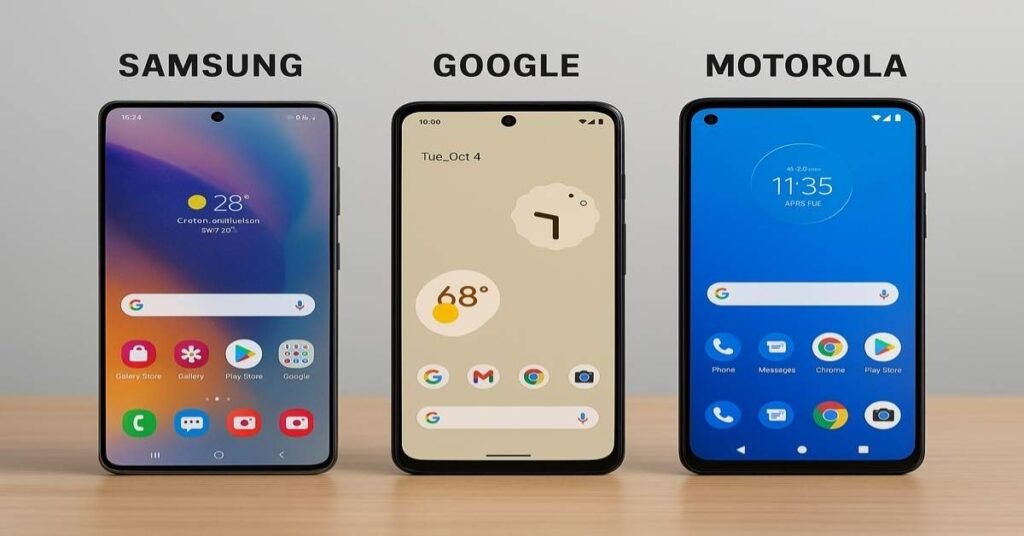
Samsung One UI vs Google Pixel UI vs Motorola Hello UI represents the defining battleground where three tech giants clash over the future of mobile interaction. Your phone doesn’t just follow commands anymore; it predicts, adapts, and learns from every tap you make. These interfaces shape how you’ll interact with ambient intelligence for years to come.
The user experience you get depends entirely on which philosophy resonates with your daily habits. Google bets on invisible AI thinking. Samsung floods you with options and controls. Motorola keeps things clean with clever gestures that just work.
Understanding the Ambient Intelligence Era: What It Means for Mobile UX
Ambient intelligence refers to your device’s ability to perceive context without a request. Various sensors, cameras, and accelerometers continuously provide data to machine models that are processed on-device – on a phone, for instance. The Pixel 9 Pro XL handles this using Google’s Tensor chip, while the Galaxy S24 Ultra uses Samsung’s Exynos or Snapdragon silicon.
This shift changes everything about the interface experience. Traditional reactive UIs wait for your input. Modern ambient systems predict what you need based on location, time, and behavior patterns. Your phone suggests replies before you type them.
Magic EditorAI features now determine which interface wins your loyalty. Google’s Magic Editor manipulates photos through generative AI. Samsung’s Circle to Search lets you find anything on screen instantly. These aren’t gimmicks—they’re fundamental changes to usability.
READ ALSO: OnePlus 13 vs Motorola Razr Ultra: The Evolution of Innovation and Design Power in the Android World
Key ambient intelligence applications today
- Adaptive brightness learning your preferences by environment.
- Smart routines are triggered based on connected devices.
- Live translation overlays during real conversations.
- Suggested actions that understand the full conversation context.
The UX Philosophy of Google Pixel UI — Minimalist, Intent-Driven Design in the Age of Intelligence

Pixel UI follows one ruthless principle: the best interface disappears completely. Google’s Pixel design strips away visual complexity so AI capabilities can handle the heavy lifting invisibly. Material You adapts colors automatically from your wallpaper without asking permission.
The Google UI prioritizes computational intelligence over manual controls. Samsung One UI vs Google Pixel UI vs Motorola Hello UI showcases how Pixel leads with AI-driven simplicity. Call Screen answers spam calls and transcribes them automatically. Magic Eraser removes unwanted objects from photos with one tap. Live Translate works across any app without switching modes — further proving Samsung One UI vs Google Pixel UI vs Motorola Hello UI differences in real-world AI performance and user experience.
Stock Android experience gets enhanced through intent-driven interactions. The Android Pixel assistant understands natural language at the OS level, not just the app level. Now Playing identifies songs passively without ever opening an app.
Google’s Pixel software strengths
- A clean application ecosystem with no more than essential software pre-installed.
- A pure Android aesthetic with consistent iconography.
- Computed photography, surpassing hardware specifications.
- Fastest Pixel updates, delivered first to devices.
However, the clean OS ideas have some shortcomings. Power users find the customizability potential quite limited as well. It becomes more challenging to discover features when visual clues are not provided, and ultimately, you are locked into a Google integration whether you want it or not.
The Core UX Philosophy of Samsung One UI — Empowerment through Customization & Feature-rich Interfaces

Samsung One UI throws subtlety out the window and embraces feature abundance. The Samsung interface gives you granular control over literally everything. Want to change how app icons look? Done. Need per-app volume controls? They exist.
The Galaxy UI innovates through one-handed reachability. Native apps keep content in the bottom half, so your thumb easily reaches. Edge panels provide quick access to tools without opening apps.
One UI features stack on top of each other like LEGO blocks. Samsung customization reaches absurd levels through Good Lock modules. Theme Park redesigns icons and colors. MultiStar adds advanced multitasking controls. Task Changer modifies recent apps’ layouts. The Samsung skin lets you rebuild Android from scratch.
One UI’s feature-rich approach
- Floating windows and pop-up views for true multitasking.
- Smart Widgets that resize based on content.
- DeX mode transforms your Samsung flagship into a desktop.
- Knox security for enterprise-grade protection.
The Galaxy S24 Ultra demonstrates the Samsung One UI philosophy perfectly. You get professional camera controls, S Pen integration, extensive customization features, and AI enhancements like Note Assist. But Samsung One UI settings menus overwhelm casual users who just want simplicity — a classic example of how Samsung One UI balances power with complexity.
READ ALSO: How iPhone’s Camera Just Evolved Overnight with iOS 26 — Unlocking Pro-Level Shots from Your Pocket
The Philosophy Behind Motorola Hello UI — A Bridge Between Stock Android and Ambient-First UX
Motorola Hello UI embodies a balance of Google’s minimalist belief and Samsung’s maximalistic belief. The stock Android interface is enhanced through real-world gestures instead of graphical complexity. Twist to turn on the camera. Chop twice for the flashlight. Three fingers for screenshots.
This Android experience respects the vanilla Android foundation while adding practical ambient features. Moto Display shows notifications without full-screen wake, saving battery dramatically. Attentive display keeps your screen on while you’re looking at it.
The ready for desktop mode connects your Samsung One UI smartphone to external displays for an experience similar to productivity on a computer. Smart charging in Samsung One UI learns when you typically unplug the phone and will stop charging overnight at 80%, helping to prolong battery life — another example of Samsung One UI blending convenience with intelligence.
Hello UI’s balanced approach
- Close to stock efficiency with thoughtful extras.
- Physical gestures cut down on menu diving.
- Minimal bloatware management required.
- Quickly access ambient features without complexity.
The trade-off? Motorola lacks Samsung’s feature depth and Google’s AI leadership. Updates arrive slower than Pixel but faster than budget Samsung devices. You get solid OS performance without cutting-edge innovation.
Comparative UX Design Elements – Home Screen, Widgets & Ambient Context Across the Three UIs
Samsung One UI vs Google Pixel UI vs Motorola Hello UI diverge dramatically in home screen philosophy. Pixel UI locks you into a 5×5 grid with the Pixel Launcher. Samsung interface offers 4×5, 4×6, 5×5, and 5×6 configurations with launcher replacement freedom. Hello UI provides moderate flexibility with stock-style vertical scrolling.
Widget implementation reveals each company’s priorities. Material You widgets on Google phone devices change colors based on the wallpaper automatically. Samsung customization enables widget stacking and edge panel integration. Motorola relies on Google’s widget system with minimal custom additions.
Personalization options create vastly different user engagement levels. One UI’s Smart Widgets resize based on content dynamically. Pixel design keeps widgets minimal to avoid visual clutter. Hello UI’s Snapshot widget provides quick information access without overwhelming your screen.
| Feature | Pixel UI | Samsung One UI | Motorola Hello UI |
|---|---|---|---|
| Grid Options | 5×5 only | 4×5, 4×6, 5×5, 5×6 | 4×5, 5×5, 5×6 |
| Custom Launchers | No | Yes | Yes |
| Widget Stacking | No | Yes | Limited |
| Theme Settings | Material You | Good Lock Modules | Stock Android |
| Icon Shapes | Limited | Extensive | Moderate |
How your devices’ lock screens vary wildly, too. On the Pixel’s firmware, they’ll show Now Playing and At a Glance notifications. On Galaxy U, they’ll present you with a Dynamic Lock Screen experience, and you can configure the widgets as you like. On the Moto Display, you get the simplest of peek notifications while preserving battery life at the same time.
AI & Ambient Intelligence Integration: How One UI, Pixel UI & Hello UI Differ in Smart Features

AI capabilities are at the center of the current smartphone battle. The Pixel 9 Pro XL best utilizes it through optimizations for its custom Tensor chip for machine learning capabilities. For example, Magic Editor features generative AI to change images in ways that would be impossible without technology. Best Take puts together the subjects from several images into one perfect photo. Audio Magic Eraser erases background noise from video recordings.
On S24 features, Samsung’s flagship devices respond with their Galaxy AI suite, which they launched. Generative Edit uses AI-creation tools to create altered photos. Circle to Search recognizes anything on your screen using visual recognition. Live Translate translates call language in real-time in over thirteen languages.
Google Assistant is now integrated at the system level on Android Pixel devices, unlike Samsung One UI, which takes a different approach to AI. This smart assistant technology interfaces with applications through voice using integrations much deeper than any competitor achieves. Call Screen now assists by filtering spam calls through transcription and automated response, highlighting how Samsung One UI still focuses more on customization than deep AI automation.
Artificial intelligence tools comparison
- Pixel specifications include machine learning processors that allow for instantaneous responses directly on the device.
- The Samsung smartphone Galaxy AI can work entirely offline, which may be more appealing to privacy-sensitive mobile users.
- Motorola relies completely on the Google OS ecosystem to drive the AI.
- The 9 Pro features exclusive integration of Gemini and replaces the previous Assistant functionality.
AI has been integrated into many productivity tools in One UI. For example, Note Assist summarizes meetings and formats documents automatically, Transcript Assist converts from voice recordings into searchable text, and Vision AI describes scenes for accessibility.
Motorola takes the modest approach with practical AI capabilities that work without hype. Intelligent charging learns patterns. Adaptive battery optimization happens automatically. Basic photo enhancement uses Google integration rather than proprietary development.
Customisation and Control vs Simplicity and Automation – UX Trade-offs Explored
Samsung One UI vs Google Pixel UI vs Motorola Hello UI forces you to choose between control and automation. Samsung customization provides granular settings for every system function imaginable. Theme settings run deep with Good Lock modules, enabling power user modifications impossible elsewhere.
Pixel UI automates decisions based on usage patterns. Adaptive Battery learns app usage and restricts background activity automatically. Material You changes appearance settings without asking permission. You trust Google’s algorithms or you don’t.
The usefulness of Android can be positive or negative based on your bias. One UI features more complexity than the casual user who just wants things to work. The stock Android experience of Pixel devices limits choice (prevents choice paralysis). Hello UI strikes a balance with smart defaults and easy overrides.
Customization spectrum breakdown
- Complete control with the Samsung interface requires a steep learning curve.
- Complete automation with the Pixel phone interface while being locked into the ecosystem.
- A middle-of-the-road approach from Motorola by maintaining Android conventions.
- Power users prefer the complexity of a Galaxy UI over the simplicity of Pixel.
Real scenarios expose these trade-offs clearly. Setting Do Not Disturb shows the contrast. Pixel design learns when you enable DND and suggests automatic schedules. Samsung skin lets you create complex rules with contact exceptions and app-specific behaviors. Motorola offers flip gestures plus basic time-based scheduling.
Battery management philosophies differ dramatically, too. Android performance depends on whether you prefer manual controls or algorithmic optimization. Samsung smartphone provides detailed usage graphs and per-app restrictions. Google phone devices automate everything through Adaptive Battery learning.
Performance, Update Cadence & Longevity – How UX Philosophy Impacts User Trust
Android performance reveals how customization affects daily performance. Pixel UI remains under a modest system footprint with little bloatware to manage. Pure Android efficiency means general smoothness. Android isn’t always the most fluid system, but fluidity is consistent day to day, even if our benchmarks don’t lead.
Samsung’s interface has heavier resource usage, given the features it provides. On the other hand, RAM Plus virtual memory mitigates the effect on software performance. The Game Optimizer controversies showed in some Samsung flagship devices that performance was throttled to manage thermals.
Software ecosystem updates determine long-term trust. Google’s Pixel software promises 7 years of OS updates for the Pixel 8 series onward. Monthly security patches arrive first. Quarterly Pixel updates add features to older devices consistently.
Update commitment comparison
- Pixel: seven OS updates + seven years of security patches.
- Samsung: four OS updates + five years of security (for flagship device only).
- Motorola: three OS updates + sporadic security patches.
- Android speed was maintained the longest through Google’s update support.
The features of One UI will continue to evolve even on older devices as updates become available. The customized features Samsung offers on its devices can only go so far through software rather than having new hardware and SoC options. However, historical delays harmed Samsung’s reputation even though they have made significant improvements as of late.
The efficiency of Android changes across different interfaces. The Pixel design has aged gracefully because it has few pre-installed apps (no storage bloat). The Galaxy UI has accumulated many features, and slow mid-range devices are noticeably slower with it. Hello UI takes a simple approach that doesn’t result in bloat over time.
Multitasking, Foldables & Emerging Form-Factors – Adapting UX for Ambient Use-Cases
Samsung’s multitasking edge didn’t happen overnight — it’s the product of years spent refining tablet software, and that experience shows every time you split a screen or drag a file between apps.
Google’s Pixel is a different story. It’s playing catch-up, but it knows it. The interface was built with the assumption that parity would come through updates rather than out of the box — and honestly, that bet is starting to pay off.
Motorola made a deliberate choice: go all-in on the flip form factor. The payoff is a genuinely polished external display experience that feels purposeful rather than tacked on.
The broader Android reality, though, is that multitasking features evolve unevenly depending on which device makers decide to prioritize what.
Multitasking capabilities ranked
- Samsung’s user interface is the result of years of developing tablets
- With the knowledge gained from competing in the first generation of foldables, the Pixel phone interface anticipates reaching parity of experience via upgrades.
- Motorola focuses exclusively on the flip form factor, allowing displays of an optimized external multitasking experience.
- In the Android experience, functionality develops asynchronously based on prioritizing form factors.
Desktop modes separate serious productivity contenders. Samsung DeX transforms your Galaxy phone into a legitimate desktop replacement. Ready For connects Motorola devices to external displays with reasonable functionality. Google abandoned desktop mode entirely for Pixel flagship devices.
Desktop Mode: Where the Serious Contenders Separate Themselves
This is where things get interesting for anyone who actually wants to get work done.
Samsung DeX is the real deal. Plug in a monitor, and your Galaxy phone becomes something that can genuinely replace a laptop for a lot of workflows. It’s not a gimmick — it’s a full desktop environment.

Motorola’s Ready For is more modest but still functional. It connects to external displays and handles the basics without pretending to be more than it is.
Google just gave up on desktop mode for Pixel entirely. Which is a strange decision for a company that talks so much about productivity, but here we are.
Wearables integration matters for ambient computing futures. The Galaxy Watch ecosystem is a substantial area for Samsung customization. All Google integration functions work across its Pixel Watch and Fitbit products. In contrast, Motorola does not currently make wearables and relies on general Android Wear support.
READ ALSO: iOS vs Android vs Windows: The OS Power Shift on Security, AI, and Digital Freedom
Which UX Philosophy Suits You? Choosing Between One UI, Pixel UI & Hello UI in the Ambient Era
Samsung One UI vs Google Pixel UI vs Motorola Hello UI ultimately depends on your relationship with technology. Maximum AI automation and trust in Google? Pixel UI delivers cutting-edge AI features first, with the longest Pixel updates support. Photography becomes effortlessly excellent through computational processing.
Need control and customization features? Samsung One UI provides granular settings for everything. Best-in-class multitasking supports S24 specs hardware perfectly. Feature-rich app ecosystem includes Samsung services and Google OS integration.
Want a simple, clean OS with useful gestures? Motorola Hello UI enhances vanilla Android without overwhelming complexity. Physical gestures reduce menu diving dramatically. Excellent value in mid-range segments makes it budget-friendly.
User persona matching
- AI Enthusiasts: Choose Pixel design for machine learning features.
- Power Users: Pick Galaxy UI for theme settings depth.
- Pragmatists: Select Hello UI for a stock Android experience, simplicity.
- Professionals: Get a Samsung flagship for DeX and Knox security.
Matching the Phone to the Person
| Who You Are | What You Should Get |
|---|---|
| AI Enthusiast | Pixel — it’s the closest thing to a research lab in your pocket |
| Power User | Samsung Galaxy — no one else offers this much to tinker with |
| Pragmatist | Motorola — clean, quick, no nonsense |
| Professional | Samsung flagship — DeX and Knox are genuinely enterprise-grade |
The evaluation scores for ambient intelligence readiness are substantially different. The Pixel 9 Pro XL has the best score with 9/10 due to AI capabilities already in the device and future expansion under the Pixel firmware commitment. The Galaxy S24 Ultra scores 7/10 since it has a present set of features, if the bloatware concerns are addressed. The Motorola score of 5/10 is an acknowledgement of building the basics well enough, even with a limited R&D budget.
Interface experience priorities determine your choice. Ecosystem lock-in matters—Google integration traps you completely, while Samsung smartphone devices allow more flexibility. Resale value favors Pixel and Samsung over Motorola significantly.
FAQs
Which interface offers the best stock Android experience?
The Hello UI by Motorola gives you the purest stock Android experience that resembles stock Android as closely as possible without heavy modifications. Pixel UI deviates more toward a stock experience off of stock Android, but is cleaner and less cartoonish due to the Material You design.
Does Samsung One UI slow down Android performance?
Compared to Pixel UI, Samsung’s interface uses more resources, but Android performance is still smooth on flagship devices. Mid-range devices have more issues using One UI functions than they would with lighter options.
How often does each interface receive updates?
The monthly security updates and quarterly feature drops contribute to Google’s promise of timely security updates on the Pixel software. Samsung’s customization includes 4 OS updates for its flagship devices, and Motorola follows with 3 OS updates of its own, but with a less predictable security update schedule than its competitors.
Which UI has better AI features?
Pixel 9 Pro XL leads in AI features through Tensor chip optimization and Google’s machine learning features. Galaxy S24 Ultra counters with a comprehensive Galaxy AI suite. Motorola relies entirely on Google’s OS infrastructure.
Can I customize Samsung One UI to look like Pixel UI?
Yes, Samsung customization through Good Lock modules enables Pixel-like minimalism. You can disable pre-installed apps, change theme settings, and replicate Material You appearance settings somewhat closely.

Ansa is a highly experienced technical writer with deep knowledge of Artificial Intelligence, software technology, and emerging digital tools. She excels in breaking down complex concepts into clear, engaging, and actionable articles. Her work empowers readers to understand and implement the latest advancements in AI and technology.