Skip to content
I have been using Google Photos for years, but in 2026 it feels like a completely different product. It is no longer just a storage app. It has turned into a smart editing and memory creation tool powered by advanced AI.
In this guide, I will break down the latest Google Photos AI features in 2026, including Remix, Magic Editor, and other new tools. I will explain what actually works, what feels useful in real life, and what still needs improvement.
Why Google Photos AI Matters in 2026
Photos are no longer just images. They are stories, memories, and sometimes even content for social media or business.
Google has invested heavily in AI through its parent company Google, especially with its Gemini models. These improvements now directly reflect inside Google Photos.
According to Google’s official announcements and developer updates, the focus is clear:
- Make editing effortless
- Automate creativity
- Improve search and organization
For users like me, this means less manual work and more intelligent suggestions.
What’s New in Google Photos AI Features 2026
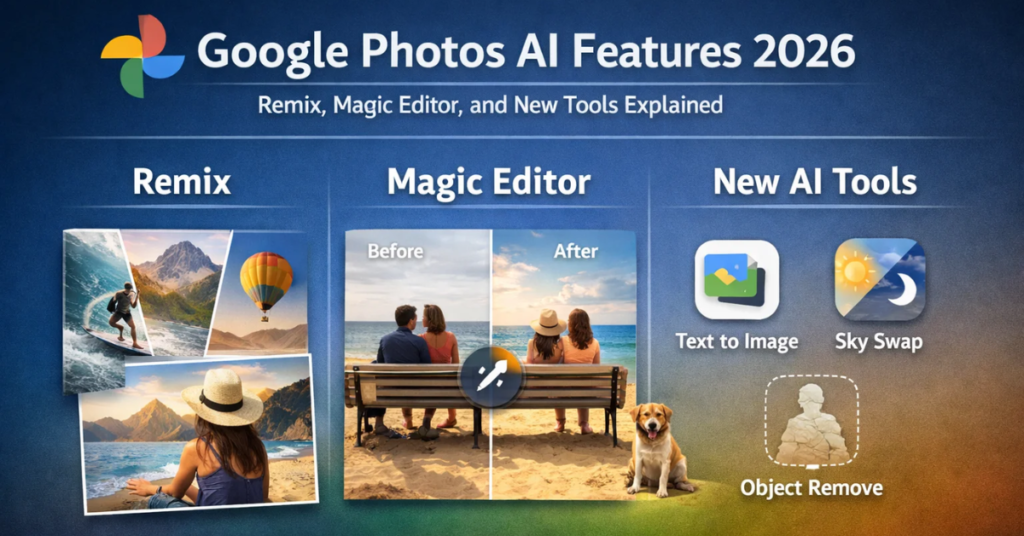
The 2026 update introduces several upgrades, but three features stand out:
- Remix
- Magic Editor improvements
- Smart AI tools for search, enhancement, and storytelling
Let me explain each in detail.
Remix Feature: Turning Photos into Creative Styles
The Remix feature feels like Google’s answer to AI-generated creativity trends.
What Remix Does
Remix transforms your existing photos into different artistic styles. It can:
- Convert images into sketches or digital art
- Apply cinematic filters
- Create stylized versions suitable for social media
I tested this feature with travel photos, and the results looked surprisingly polished. It did not feel like a cheap filter. It actually changed the visual mood of the image.
Why It Matters
People now want quick content for platforms like Instagram and YouTube. Remix helps create visually appealing images without using external apps.
Real Use Case
I clicked a normal sunset photo. Remix turned it into a cinematic frame with enhanced lighting and color grading. It looked like something edited in professional software.
Magic Editor 2026: Smarter and More Practical
Magic Editor was already popular, but in 2026 it feels much more refined.
Key Improvements
- Better object removal
- Improved background replacement
- Natural lighting adjustments
- Context-aware editing
Earlier, edits sometimes looked artificial. Now, the transitions feel smoother and more realistic.
What I Noticed
When I removed a person from a crowded image, the background filled in naturally. Earlier versions struggled with this.
Why It Stands Out
Magic Editor now competes with professional editing tools. It reduces the need for apps like Photoshop for basic edits.
Google has shared in its official blog that these improvements come from better AI models trained on visual understanding.
AI-Powered Search: Still the Strongest Feature
Google Photos has always led in search, and it continues to dominate in 2026.
What It Can Do Now
You can search using natural language like:
- “Photos of me at the beach”
- “Birthday party with cake”
- “Red dress in evening light”
The AI understands context, objects, and even emotions in some cases.
Why This Matters
Most people have thousands of photos. Finding one specific image manually is frustrating.
With AI search, I found a 3-year-old image in seconds just by typing a vague description.
This feature is backed by Google’s advancements in computer vision and machine learning, which are widely documented in their research publications.
AI Memory Creation and Highlights
Google Photos now creates better memory collections automatically.
What’s New
- Smarter grouping of events
- Emotional highlights
- Cinematic video creation
The AI selects the best photos and compiles them into short videos with music.
My Experience
I noticed fewer random or irrelevant memories. The selections felt more meaningful and personal.
Photo Enhancement Tools: One Tap Improvements
Google has simplified editing for casual users.
Key Features
- One-tap enhancement
- Lighting correction
- Sharpness improvements
- Color balancing
These tools now rely heavily on AI instead of manual sliders.
Why This Works
Not everyone wants to learn editing. These tools provide quick results without complexity.
Privacy and Data Safety
Whenever AI handles personal photos, privacy becomes a concern.
Google states that:
- Photos remain private unless shared
- AI processing follows strict security protocols
- Users control their data
I still recommend avoiding sensitive uploads, but overall Google maintains strong privacy standards based on its official policies.
Limitations of Google Photos AI in 2026
No tool is perfect. I noticed a few limitations.
1. Over-editing in Some Cases
Sometimes AI enhances too much, making images look unrealistic.
2. Feature Availability
Some tools are limited to specific devices or require Google One subscription.
3. Internet Dependency
Many AI features need an active connection.
How Google Photos Compares to Other AI Tools
Compared to standalone editing apps, Google Photos offers:
Advantages
- Easy to use
- Integrated storage
- Automated features
Disadvantages
- Less control than professional tools
- Limited customization for advanced users
If you want quick edits, Google Photos works great. If you want full control, dedicated software still wins.
Who Should Use Google Photos AI Features
I believe these features are perfect for:
Casual Users
People who want quick edits and organized memories.
Content Creators
Creators who need fast visual content.
Professionals (Basic Use)
Photographers can use it for quick previews and sorting.
The Future of Google Photos AI
From what I see, Google will continue to push AI deeper into the platform.
Expected improvements include:
- Better video editing tools
- More realistic AI edits
- Voice-based photo search
- Deeper integration with Gemini AI
Google is clearly moving toward a fully automated creative assistant.
Final Thoughts
Google Photos in 2026 is no longer just a gallery app. It has become a smart AI-powered platform that helps you edit, organize, and relive your memories.
Remix adds creativity. Magic Editor adds precision. AI search keeps everything accessible.
I still use other tools for advanced work, but for everyday use, Google Photos handles almost everything I need.
If you have not explored these features yet, it is worth trying them. You might end up using fewer apps than before.
Sources
- Google Official Blog and Product Updates
- Google AI Research Publications
- Google Photos Help Documentation
These sources provide accurate and verified information about features and AI development.
Frequently Asked Questions (FAQ)
1. What are the new AI features in Google Photos 2026?
In 2026, Google Photos introduces major AI upgrades like Remix, improved Magic Editor, smarter search, and enhanced memory creation tools. These features focus on automation, creativity, and better user experience.
2. What is the Remix feature in Google Photos?
Remix is an AI-powered tool that transforms your photos into different artistic styles. It can turn images into cinematic shots, sketches, or stylized visuals suitable for social media.
3. How does Magic Editor work in 2026?
Magic Editor uses AI to edit photos intelligently. It allows you to remove objects, change backgrounds, adjust lighting, and improve composition with minimal manual effort.
4. Is Google Photos AI free to use?
Basic AI features in Google Photos are free. However, some advanced tools may require a Google One subscription or may be limited based on your device.
5. Can Google Photos AI edit videos as well?
As of 2026, Google Photos offers basic video enhancements and AI-generated memory clips. However, full AI-powered video editing is still evolving.
6. How accurate is AI search in Google Photos?
AI search is highly accurate. You can search using natural language, and the system can identify objects, people, locations, and even events in your photos.
7. Is my data safe with Google Photos AI features?
Google states that your data remains private and secure. Photos are not shared without your permission, and AI processing follows strict privacy guidelines.
8. Do these features work offline?
Most AI features require an internet connection because processing happens on cloud servers.
9. Can I use Magic Editor for professional photo editing?
Magic Editor works well for quick and smart edits. However, professional photographers may still prefer advanced tools for detailed control.
10. Which devices support Google Photos AI features?
Most features work on Android, iOS, and web. However, some advanced AI tools may be limited to newer devices or specific regions.
Tool Tips for Better User Experience
Use Clear Search Queries
Instead of typing “old photo,” try “birthday party with cake.” Clear queries help AI deliver better results.
Try Remix on High-Quality Images
Remix works best with sharp, well-lit photos. Better input gives better output.
Use Magic Editor Step by Step
Do not apply too many edits at once. Make small changes and review results for a more natural look.
Review AI Edits Before Saving
AI is smart, but not perfect. Always double-check edits to avoid over-processing.
Organize Your Photos Regularly
Even with AI, a well-organized library improves search and memory suggestions.
Keep Your App Updated
Google frequently improves AI features. Updating ensures you get the latest tools and fixes.
Avoid Uploading Sensitive Content
Even though Google follows strict privacy policies, it is always safer to avoid uploading confidential images.
Use Multiple Features Together
Combine Remix, Magic Editor, and enhancements for better results instead of relying on just one tool.
Test Different Edits
AI offers multiple suggestions. Try different versions to find the best one.
Sync Across Devices
Enable sync so you can edit and access your photos from any device seamlessly.

Ansa is a highly experienced technical writer with deep knowledge of Artificial Intelligence, software technology, and emerging digital tools. She excels in breaking down complex concepts into clear, engaging, and actionable articles. Her work empowers readers to understand and implement the latest advancements in AI and technology.